GTA 6 at 30fps Feels Choppy? Try Raising Motion Blur
Quick answer
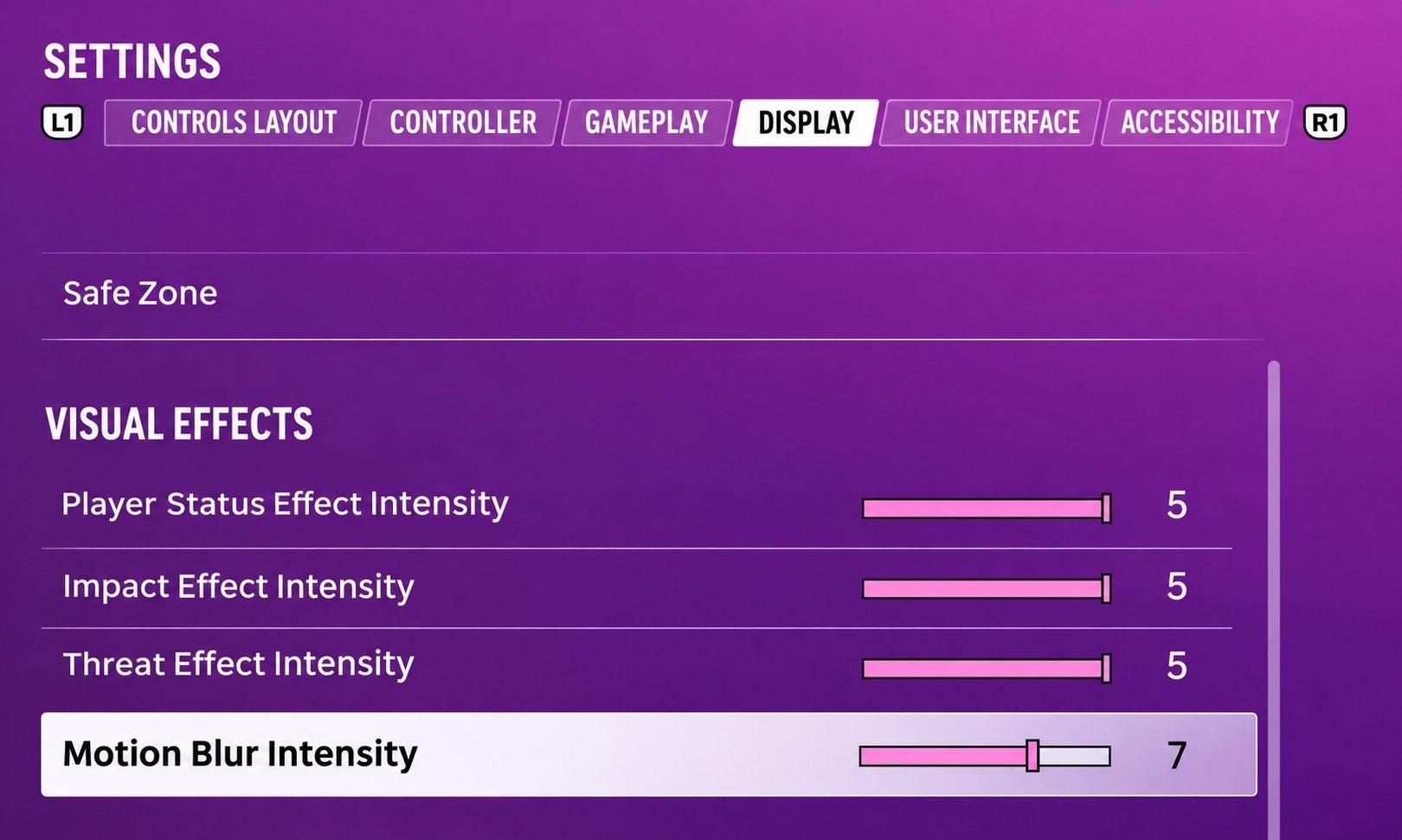
Go to Settings > Display > Visual Effects > Motion Blur Intensity. The default is 3; raising it to around 7, or even to the maximum, blends frames during camera pans so 30fps feels less choppy. It won't raise your frame rate, and if blur bothers you or makes you feel queasy, turn it down instead.
| Frame rate | 30fps on every console |
|---|---|
| Setting | Settings > Display > Motion Blur Intensity |
| Default | 3 |
| Try | 7 or max |
| Raises FPS? | No |
Why GTA 6 can feel choppy
Rockstar confirmed before launch that GTA 6 runs at 30fps on PS5, PS5 Pro and Xbox Series X|S, with no performance mode. At 30fps, fast camera turns can look jerky, especially if you're used to 60fps games.
Where to find the Motion Blur setting
- Open the pause menu and go to Settings.
- Switch to the Display tab (use L1/R1 or LB/RB to move between tabs).
- Scroll down to the Visual Effects section.
- Select Motion Blur Intensity and raise it from the default of 3.
We checked this in our own playthrough: the screenshot on this page shows the slider set to 7. Higher values smear frames together during camera movement, which makes pans and fast driving look smoother. It does not change the frame rate itself.
Other visual effect sliders
The same Visual Effects section also has Player Status Effect Intensity, Impact Effect Intensity and Threat Effect Intensity. They control how strong the screen effects are when you're hurt, hit or in danger. Turn them down if you want a cleaner picture.
Our screenshots
In-game screenshots from our own playthrough.
Frequently asked questions
Does GTA 6 have a 60fps mode?
No. GTA 6 runs at 30fps on every console, including PS5 Pro, and Rockstar has not announced a performance mode.
What is the best motion blur setting in GTA 6?
Many players find 7 or higher makes 30fps feel smoother. The default is 3. Try a few values and keep what looks best to you.
Does motion blur increase FPS in GTA 6?
No. It only changes how motion looks; the game still runs at 30fps.